Clicky Low Profile Keyboard Switches are gaining attention because more users now expect a keyboard to deliver tactile clarity, audible confirmation, and better long-session comfort at the same time. Buyers are also evaluating keyboard height, switch travel, and ergonomic suitability for office, creative, and hybrid-work use.
Why Wrist Pain Has Become a Real Keyboard Buying Issue
From GATERON's perspective, wrist discomfort should not be treated as a minor complaint. It is often related to typing posture, keyboard slope, and the amount of extension the wrist must maintain during long work sessions. OSHA advises users to keep wrists in a neutral position and specifically warns against using keyboard feet when they increase wrist bending. Mayo Clinic similarly recommends keeping wrists straight, forearms aligned, and shoulders relaxed while typing.
Research also supports this direction. A well-cited study on typing posture found that reducing keyboard slope and thickness can help reduce wrist extension, and recommended avoiding wrist extension greater than 30 degrees during prolonged computer use. Another study reported that moving keyboard slope from +15° to -15° reduced mean wrist extension by about 13 degrees. These findings matter because the keyboard is not only an input device. It is also a structural part of the user's working posture.
That is why product selection should begin with ergonomics, not only acoustics. A switch may sound satisfying, but if the overall typing geometry forces unnecessary wrist strain, the user experience will decline over time.
What Makes Clicky Low Profile Keyboard Switches Different
Traditional clicky switches are often associated with a taller keyboard profile and longer travel. By contrast, Clicky Low Profile Keyboard Switches aim to preserve audible actuation while reducing overall switch height and motion distance. This combination is especially relevant for buyers who want a more compact board without fully giving up the crisp response that clicky mechanisms provide.
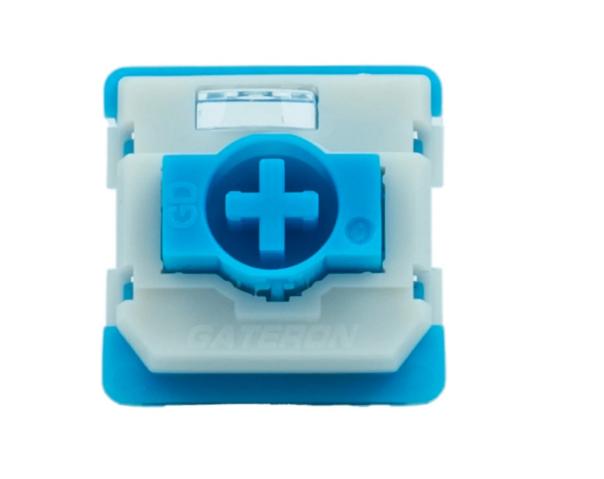
At GATERON, the low-profile platform is built to support a slimmer keyboard structure without giving up clear mechanical feedback. A representative example is the GATERON KS-33 Low Profile Bamboo Clicky Switch Set, which features 1.7±0.5 mm pre-travel and 3.0±0.2 mm total travel in a compact low-profile format. Compared with the roughly 4.0 mm travel commonly associated with standard mechanical switches, this shorter travel path helps create a faster and more efficient keystroke experience on thinner keyboards.
This design direction can support ergonomics in two ways:
✓ A thinner keyboard structure may help users maintain a lower hand position.
✓ Shorter travel can reduce repeated finger motion across a full day of typing.
✓ Earlier actuation can make input feel more immediate and controlled.
These factors do not "cure" wrist pain by themselves. However, they can contribute to a more ergonomic typing system when combined with correct desk setup and neutral wrist posture.
How GATERON Approaches Clicky Low Profile Ergonomics
When clients evaluate Clicky Low Profile Keyboard Switches, they often assume the decision is mainly about sound. In practice, the engineering target is broader. The switch must create a clear click event, maintain structural stability in a slimmer body, and avoid making the press feel harsh or unstable.
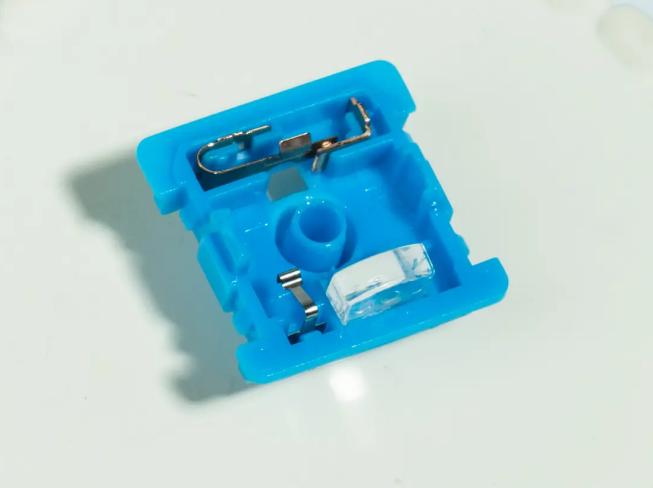
A useful example is the GATERON KS-33 Low Profile Bamboo Clicky Switch Set. This switch is a clicky model with a total travel of 3.0±0.2 mm, a pre-travel of 1.7±0.5 mm, and an operating force of 60±15 gf. It has a POM stem, a POK top housing, and a POM bottom housing. It supports SMD LEDs and comes pre-lubed in a 3-pin configuration.
These details are commercially relevant because they indicate how the product is positioned:
✓ The force range is substantial enough to produce a defined click response.
✓ The short pre-travel supports faster actuation on slim keyboards.
✓ The low-profile structure helps brands develop thinner keyboard layouts.
✓ With its pre-lubed design, the switch is built to offer smoother operation and steadier performance upon first use.
For buyers, this means the product is not merely "a loud low-profile switch." It is a compact clicky solution intended for slim mechanical boards that still require feedback and a distinct actuation signature.
Who Should Choose Clicky Low Profile Keyboard Switches
Not every user with wrist discomfort should automatically choose a clicky switch. The better question is whether the user needs confirmation when they press the button but doesn't want a tall keyboard. This is when Clicky Low Profile Keyboard Switches can be useful.
They are often good for:
✓ Office workers who would rather get clear confirmation of their input than silent keypresses.
✓ People who write and enter data who care about rhythm and knowing where they are.
✓ People who want to buy slim keyboards for desks that aren't very deep.
✓ Brands looking for a unique, low-profile product line with a stronger typing identity.
They are generally less ideal for environments that require stricter noise reduction. In that case, silent or lighter tactile low-profile switches might be better. From an ergonomic standpoint, the switch should match the user's force preference, desk height, and typing duration. Even the best low-profile switch cannot compensate for poor workstation setup. OSHA, NIOSH, and Mayo Clinic all emphasize that keyboard choice is only one part of a larger ergonomic system.
How to Ease Wrist Strain Beyond the Switch Itself
The best way to teach clients is to combine choosing a switch with being disciplined at work. A lower keyboard profile is helpful, but it works best when the rest of the setup lets you sit up straight.
Think about these rules:
✓ Keep the keyboard in a position that keeps your wrists straight and in line with your forearms.
✓ Don't raise the keyboard feet if they make your wrists bend more.
✓ Put the keyboard in front of you and relax your shoulders.
✓ Wrist rests should support your hands during breaks, not serve as a point of continuous pressure while you type.
✓ Review keyboard slope, chair height, and forearm angle together.
From a product development standpoint, this is why low-profile switches continue to matter. They fit naturally into thinner keyboard designs that can better support modern ergonomic expectations when properly implemented.
What Buyers Should Do Next
For clients exploring Clicky Low Profile Keyboard Switches, the decision should be based on more than novelty. The key questions are practical: Does the switch support a lower typing profile? Does it deliver clear feedback without excessive finger travel? Does it fit the intended user environment and keyboard architecture?
At GATERON, we recommend evaluating low-profile clicky products through a full-use-case lens: typing duration, desk setup, sound expectations, and board thickness. For many buyers, the next step is not to order blindly, but to compare feel, force, and travel through a switch tester before final platform selection. GATERON's low-profile switch tester and KS-33 low-profile series provide a useful starting point for that process.
CTA: If your keyboard project needs a thinner structure with clear actuation feedback, check out GATERON's low-profile series and see if Clicky Low Profile Keyboard Switches are the right ergonomic and commercial fit for your next build. For more information, read OSHA's keyboard safety tips, the Mayo Clinic's office ergonomics tips, and GATERON's official low-profile switch specifications.



