What is the uniqueness of Low Profile Switches?
Low profile switches are constructed to minimize the actuation distance, typically 1.0-1.2mm, as opposed to regular switches with 2.0-2.2mm. This shortening of the distance between switches gives them shorter response times, which is suitable for gaming and typing a lot.
The important characteristics of Low Profile Switches are:
- Shortened travelling distance: Accelerated key presses.
- Slim design: Improves the ergonomics of the keyboards.
- Diversity of types of switches: Linear, tactile, and clicky.
- Acoustics: Fewer travels produce less noise, but change the switch sound signature.
The above features render low profile switches an ideal substitute in the low profile keyboard acoustic tests.
Introduction: Acoustics of Low Profile Switches
- Mechanical keyboards have been developed into a better product, and low profile switches have become a favored option with gamers, content creators, and typing enthusiasts. In contrast to the old-fashioned mechanical switches, the low profile switches decrease the travel distance and provide a slimmer profile, which provides greater speed and ergonomics. This paper is a detailed low profile switch sound testof the GATERON KS-33 Low Profile 2.0 Mechanical Switch (Black Bottom Housing) and how it compares with other low profile mechanical switches.
- Switches of low profile not only modify the typing feel but also modify the sound of the keyboards. Low profile keyboard switch sound tests assist users in finding the best switches that fit their typing habits, workspace settings, and gaming requirements.
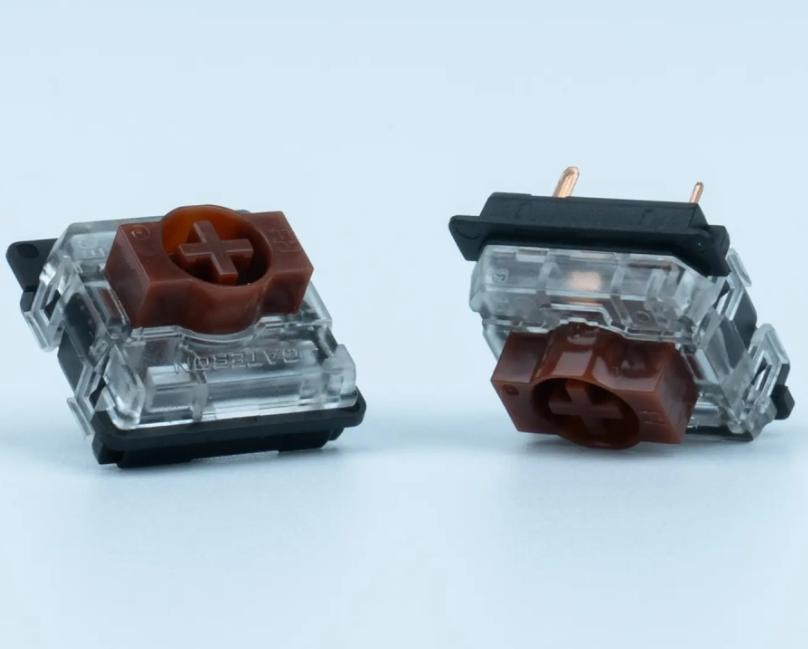
GATERON KS-33 Low Profile 2.0 Mechanical Switch Overview
GATERON KS-33 Low Profile Switch is designed for strict typing, gaming, and content development. The packs have 35 switches each and can only be used with GATERON low-profile switch-designed keyboards.
Technical Specifications:
- Stem Material: POM
- Top Housing: PC, Transparent
- Bottom Housing: Nylon, Black
- LED Support: SMD
- Pre-lubed: Yes
- Compatibility: Only GATERON low profile keyboards.
These switches have a combination of low profile switch sounds as well as smooth actuation that offers the best typing experience. The GATERON KS-33 is available on an additional product page.
Low Profile Switch Sound Test Methodology
To perform a low profile switch sound test, it is necessary to record the switches in the same conditions, measure the noise levels, and determine the sound profile of each type.
Steps for Testing:
- Installation of Keyboard: Install the low profile switches on any compatible GATERON keyboard.
- Audio Recording: Microphones should be of high quality in order to record typing sounds.
- Typing Patterns: Compare test linear, tactile, and clicky switches.
- Noise Analysis: Assess switch noise level, actuation sound, and acoustic performance.
- Comparison: Comparison made to other low profile mechanical switches.
This solution also guarantees a proper low profile switch audio sample to both amateurs and professionals.
Comparison Low Profile Switch Sound Linear, Tactile, and Clicky
Various types of switches have different acoustic signatures. The key to making the correct choice of switch is to understand them.
- Linear Low Profile Switches
Linear switches have a continuous keystroke. Gamers prefer them because they can react quickly. The sound is low-profile linear switch, and is usually soft, hence suited to a low environment.
- Tactile Low Profile Switches
Tactile switches provide a bump at the actuation location. They are also able to give good feedback and are relatively noise-free. These switches are ideal for typing and content development, whereby feedback is valued without making too much noise.
- Clicky Low Profile Switches
Clicky switches provide both feedback and an audible click. The clicky switch sound is low profile, and the sound is clear and crisp when one pushes the key. The switches are also very good when users want to feel the sound of the switches, but they would not be appropriate at workstations.

Assessment of Low Profile Keyboard Acoustics
The low-profile keyboard sound comparison involves the analysis of the acoustic output of every type of switch. Factors include:
- Key Travel: Fewer keystroke sounds on total keystrokes.
- Housing Material: PC tops are transparent tops, and nylon bottoms are black in the KS-33 to attain certain acoustic resonance.
- Lubrication: Pre-lubricated switches reduce friction noise.
- Typing Force: Forces that are needed to actuate influence the sound of key presses.
Considering these factors, users will be able to find out which switch is the best tradeoff between performance and low-profile switch noise output.
Performance hard disk: Low Profile Switch Sound Test
Creators of content usually need switches that have a minimum noise level with a sense of touch. The reason why GATERON KS-33 switches are the best in this aspect is because of their pre-lubed stem and accuracy in the actuation.
It has more advantages, such as a short switching distance and rapid response times to gamers. Be it the Linear Type invented to provide quick keystrokes or the Tactile Type to provide a responsive feedback, the low profile switch sound test is designed to optimize the typing experience.
- Streaming: There is little noise, which makes the audio recording clear.
- Gaming: Rapid reaction enhances reaction times.
- Office Work: It is a quiet style of work that does not trouble other workers.
Noise Level Measurement: Tips and Tools
In order to perform a useful low profile switch typing sound test, one should accurately measure the levels of noise.
Recommended Tools:
- Decibel Meter: used to measure sound intensity.
- High-Fidelity Microphone: Records realistic sounds.
- Software Analysis: Software, such as Audacity or REAPER, measures frequency and amplitude.
With such a combination, you will be able to test the low profile keyboard sound comparison in an objective way, which will assist in the selection of the perfect switch.
Conclusion:
The selection of the appropriate low profile switch depends on the knowledge of sound characteristics, typing feel, and application. The Gateron KS-33 Low Profile 2.0 Mechanical Switch is characterized by the high construction quality, the smooth stems are pre-lubricated, and acoustical playing is also optimized. It might be quiet low-profile switches required in an office, tactile switches required in content creation, or clicky switches required in a satisfying typing experience; a low profile switch sound test can be used to make an informed decision.



